
Research
Share Knowledge
Brainstorm Ideas
Achieve More
Research
Share Knowledge
Brainstorm Ideas
Picture a CIO reviewing a proposal for an AI observability platform that promises to cut alert noise. At the same time, the monitoring stack the company already runs includes machine-learning detection nobody has tuned. The scenario is hypothetical; the pressure behind it is not. In Grafana Labs' 2026 Observability Survey, 30% of respondents named alert fatigue as their biggest obstacle to faster incident response, the most common answer.
For enterprises on Microsoft Azure, part of the answer may already be in your subscription. Azure Monitor includes anomaly detection that learns what normal looks like, and Microsoft made the Azure Copilot Observability Agent generally available in June 2026. Our reading of Microsoft's documentation is that what these capabilities deliver depends less on the features than on telemetry coverage, tuning, and ownership. That is the work to audit before signing another contract, and this article covers audits about AI built into Azure for monitoring and incident response, not Azure’s AI development services.
Before that audit, one distinction matters. Microsoft’s pages describe three kinds of AI in Azure operations; we group them into three classes that differ in what they do, where they stop, and how they are billed.
Microsoft’s documentation describes three kinds of AI for detecting and responding to incidents. The grouping/classification is our interpretation; the boundaries of each class come from Microsoft’s own pages. Azure Monitor has two built-in layers: detection (dynamic thresholds and Smart Detection) and AI-assisted investigation (the Observability Agent, which Microsoft’s Azure Copilot provides access to). Its usage is billed separately from Monitor’s alert charges.”
Azure Monitor’s native anomaly detection (dynamic thresholds and Smart Detection) learns normal ranges and alerts on deviations. It stops at the alert and carries Azure Monitor’s usual alert-rule charges. Monitor’s Azure Copilot Observability Agent, billed by usage in Azure Agent credits, groups related alerts into issues (preview), investigates, and suggests mitigations, but doesn’t make changes to the environment.
Adding the Azure SRE Agent, a separate service, enables starting on an alert, finding a probable root cause, and opening tickets. The agent can suggest remediation steps or, when configured, execute mitigations, with always-on plus usage charges.
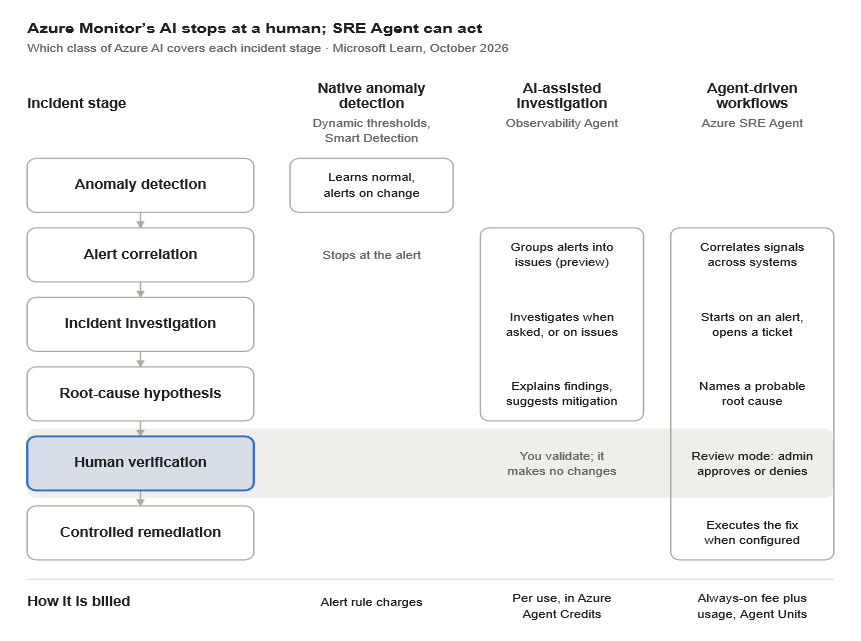
Read through the stages. Native detection covers only the first stage. The Observability Agent stops before the human check. Only the SRE Agent performs remediation, and only when configured to.
Once configured well, one documented need goes beyond what the Observability Agent does and justifies adding the Azure SRE Agent. The other depends on how far your incidents reach beyond Azure.
Even in its autonomous operations (preview), the Observability Agent produces issues, not actions. It can correlate alerts, conduct autonomous triage and investigation, provide explanations and suggestions, and create Azure Monitor issues, but doesn’t make any changes to the environment, which is where the SRE Agent comes in.
The SRE Agent is a separate service with its own always-on charge and can carry out autonomous incident response, diagnosis, orchestration, and controlled operational response. The agent’s action-oriented nature allows users to carry out root-cause analysis, create custom agents & use runbooks, and execute approved or autonomous mitigations within configured guardrails. Microsoft describes the SRE agent’s remediation model as ranging from human-reviewed recommendations to fully automated responses.
The Observability Agent works from Azure data the signed-in user is authorized to access; the pages we reviewed do not say how it handles systems outside Azure.
SRE Agent documentation mentions connectors for third-party monitoring tools such as Datadog, Dynatrace, Splunk, and New Relic, plus MCP servers for other systems. It acts through its own managed identity, which reaches the resource groups or subscriptions granted to it. Our reading is that if your incidents regularly cross tools Azure Monitor doesn’t cover, that reach is the case for adding it.
To test it, list the tools your last ten incidents touched and count how many sit outside Azure Monitor.
Note for CISO: An active response plan is necessary for the SRE Agent to act against relevant Azure Monitor incidents. However, agent run mode in such response plans defaults to autonomous. Microsoft suggests spending 2 to 4 weeks in Review run mode first.
Each capability has preconditions, and Microsoft's documentation is candid about them.
Taken together, our reading is that the gap between owning these capabilities and benefiting from them is operational. Someone must choose:
None of these are procurement decisions. That raises the obvious question: does the work pay off?
The best available proof comes from Microsoft's own publications, so read it as promising rather than conclusive.
In Microsoft's announcement of the Observability agent's general availability, Narmada Krishnaswamy, Head of KPMG Audit Application Support and Operations, said that since adopting these capabilities, KPMG has reclaimed "an estimated 250 engineering hours monthly." She adds that it returns investigations and recommendations "almost immediately, compared to hours or even days previously."
Microsoft's November 2025 customer story on Ecolab reports that the company's daily alerts fell from 30–40 to under 10 on average within a couple of months. Ecolab used Azure SRE Agent, the third class above, which Microsoft now bills with an always-on charge plus usage. It adopted the SRE agent during its preview and worked closely with Microsoft to shape the product. The story gives no time-to-resolution figure. As the story describes it, Ecolab fed its Azure Monitor alerts into SRE Agent, connected it to Azure DevOps to raise tickets, and receives a daily incident report. Our reading is that this was integration and routine built on alerts it already had, not new monitoring, and that the story describes triage and ticketing, not automated fixes.
Neither case is independent, and neither tells you what a typical enterprise will see. Both show what engaged early adopters reported in Microsoft's own publications.
A skeptical CTO will say these built-in tools have limits. They do.
Smart Detection is not fully predictable, and dynamic thresholds can miss slow drift. The Observability Agent suggests but does not act, and its autonomous operations remain in preview. Practitioners are wary as well: in Grafana Labs' survey, 95% said it matters that AI tools explain their reasoning, and 15% said they do not yet trust AI to act on their behalf. Our reading is that SRE Agent’s Review mode, described above, is the design answer to that wariness.
So, the audit is not an argument against buying. It is an argument about order. If it shows the built-in capabilities fall short, the enterprise buys against documented requirements instead of a general hope for less noise. The needs described above show what documented requirements look like: acting on findings and reaching tools beyond Azure Monitor. The audit also sharpens the buying conversation. Microsoft says the Observability Agent’s accuracy depends on complete telemetry. Ask any vendor pitching an AI observability platform what its accuracy depends on, and whether your telemetry meets that standard today. Then ask how it performs on your last incidents, compared with the built-in agent.
Microsoft’s incident-management guidance advises keeping “a library of scripts and infrastructure-as-code (IaC) templates for recovery, validation, troubleshooting, and root cause analysis” (Well-Architected OE:08).
Before approving new AI observability spend, ask the team that runs Azure operations to answer five questions in writing:
Three things could change this argument. Microsoft may revise agent pricing. Preview features, including the Observability Agent’s autonomous operations and the Smart Detection migration, may change before general availability. And independent evidence may confirm or contradict the early, vendor-published results.
Each leader can take one question into the next leadership meeting:
The AI you already have is only as useful as the telemetry you feed it and the team that owns it. Check before you buy more.
If your team needs Microsoft Azure specialists to run this audit, ITPN can help you find them.